カウントダウン カウンタ|タイマー
English
Français
Deutsch
Español
日本語
繁體
简体
Português
Italiano
Русский
हिन्दी
ไทย
Indonesia
Filipino
Nederlands
Dansk
Svenska
Norsk
Ελληνικά
Polska
Türkçe
العربية
カウントダウン
カウンタ|タイマー
カウントダウン
カウンタ|タイマー
カウントダウン
赤ちゃん誕生
New Toy
妊娠日期
バレンタインデー
母の日
婚約
周年記念
誕生日
宴会
結婚式
家に帰る
休暇 カウントダウン
休日
受験日期
18歳の
退職
離れる
戻る学校へ
卒業式
海外に行く
旅行
オープニング
オープニング
オープニング
会議
音楽会
劇場
選挙
選手権
訪問
訪問
スーパーボウル
FIFAワールドカップ
新年
中国の旧正月
新年 Cards
Wedding Card
Holiday Card
Printing Card
春
夏
秋
冬
Kids Song
カウンタ|タイマー
愛情
私は君を愛している
私は住んでいる
結婚
来此已经
愛情
来此已经 カウントダウン|カウンタ|タイマー
カウントダウン|カウンタ|タイマー 道具!
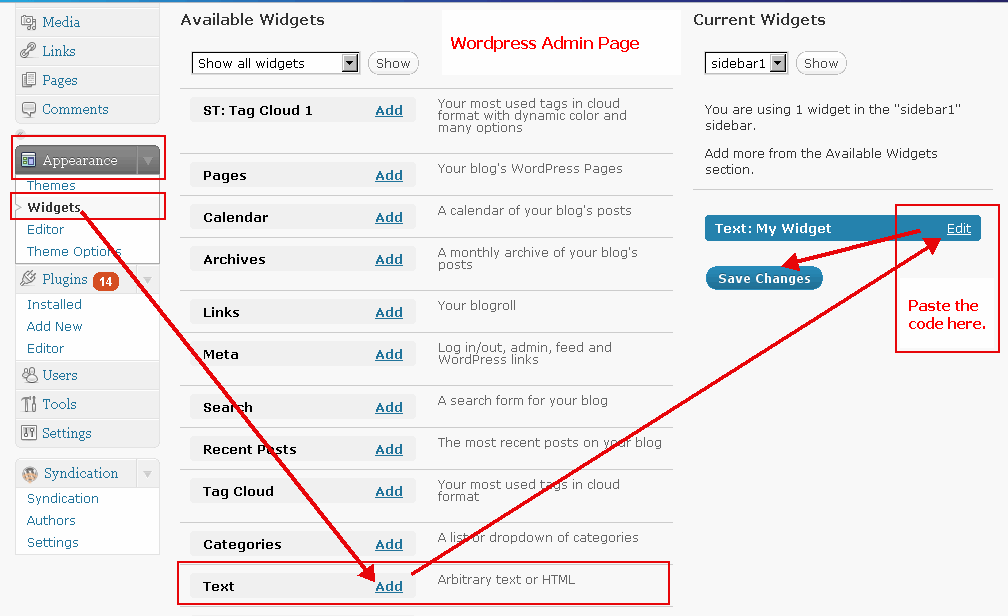
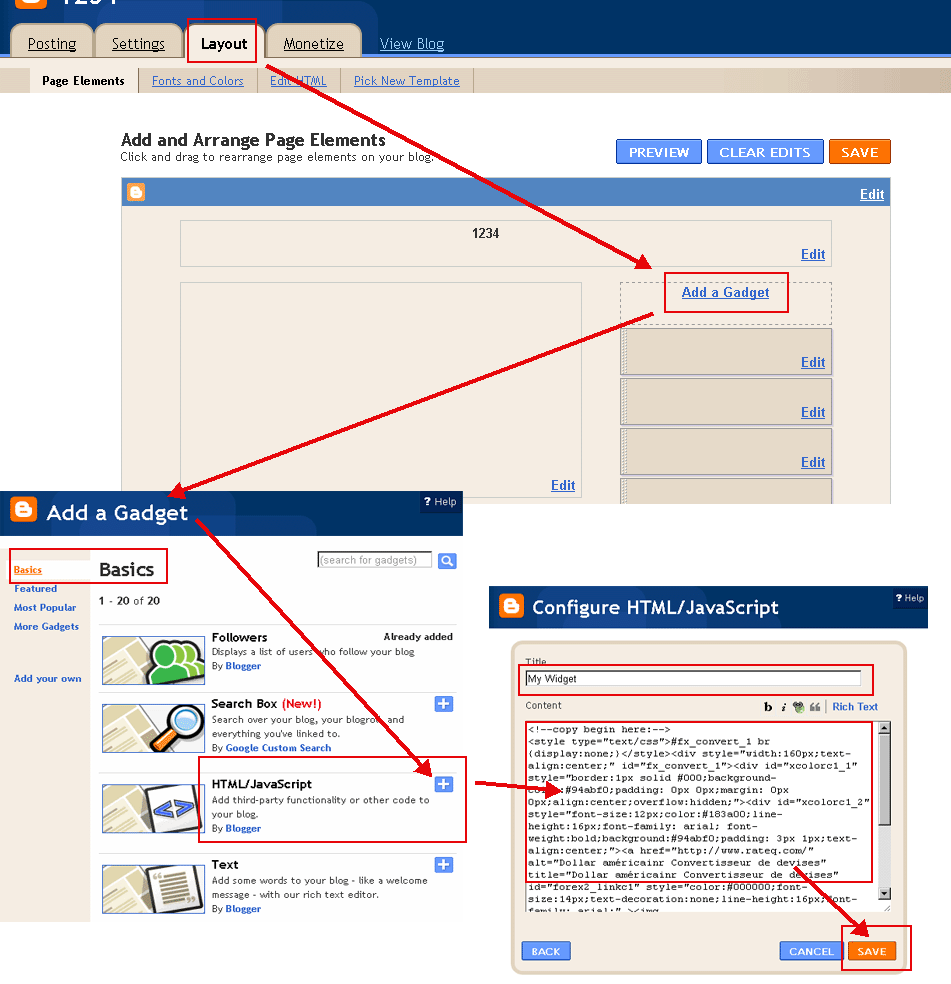
コピーボタンを押すとあなたのブログやウェブサイトに貼り付けます。
(以下のHTML 'モード'があなたのブログに投稿するスイッチ。例:
ワードプレスの例
,
Bloggerの例
)
日期(年-月-日):
入力:
色の選択(
?
):
フォントの色(
?
):
来此已经
クリップボードにコピー
<!--copy begin here:--> <style type="text/css">#fx_convert_1 br {display:none;}</style><div style="width:190px;text-align:center;" id="fx_convert_1"><div id="xcolorc1_1" style="border:1px solid #000;background-color:#94abf0;padding: 0px 0px;margin: 0px 0px;align:center;overflow:hidden;"><div id="xcolorc1_2" style="font-size:12px;color:#183a00;line-height:16px;font-family: arial; font-weight:bold;background:#94abf0;padding: 3px 1px;text-align:center;"><a href="http://jp.freecountdown.net/来此已经" alt="来此已经 | カウントダウン|カウンタ|タイマー" title="来此已经 | カウントダウン|カウンタ|タイマー" id="xcount_link1" style="color:#111111;font-size:14px;text-decoration:none;line-height:16px;font-family: arial;" >来此已经</a></div><div id="xcount1_814927756" style="font-size: 1em;font-family: arial; font-weight:bold"></div><script src="http://jp.freecountdown.net/z.php?text=&t=1&fd=2026-11-22&dir=down&id=1_814927756&fc=111111"></script></div></div> <!--copy end here:-->
来此已经
クリップボードにコピー
<!--copy begin here:--> <style type="text/css">#fx_convert_1 br {display:none;}</style><div style="width:300px;text-align:center;" id="fx_convert_1"><div id="xcolorc2_1" style="border:1px solid #000;background-color:#94abf0;padding: 0px 0px;margin: 0px 0px;align:center;overflow:hidden;"><div id="xcolorc2_2" style="font-size:12px;color:#183a00;line-height:16px;font-family: arial; font-weight:bold;background:#94abf0;padding: 3px 1px;text-align:center;"><a href="http://jp.freecountdown.net/来此已经" alt="来此已经 | カウントダウン|カウンタ|タイマー" title="来此已经 | カウントダウン|カウンタ|タイマー" id="xcount_link2" style="color:#111111;font-size:14px;text-decoration:none;line-height:16px;font-family: arial;" >来此已经</a></div><div id="xcount2_85440944" style="font-size: 1em;font-family: arial; font-weight:bold"></div><script src="http://jp.freecountdown.net/z.php?text=&t=2&fd=2026-11-22&dir=down&id=2_85440944&fc=111111"></script></div></div> <!--copy end here:-->
来此已经
クリップボードにコピー
<!--copy begin here:--> <style type="text/css">#fx_convert_1 br {display:none;}</style><div style="width:190px;text-align:center;" id="fx_convert_1"><div id="xcolorc3_1" style="border:1px solid #000;background-color:#94abf0;padding: 0px 0px;margin: 0px 0px;align:center;overflow:hidden;"><div id="xcolorc3_2" style="font-size:12px;color:#183a00;line-height:16px;font-family: arial; font-weight:bold;background:#94abf0;padding: 3px 1px;text-align:center;"><script src="http://jp.freecountdown.net/z.php?text=&t=3&fd=2026-11-22&dir=down&id=3_1062897787&fc=111111"></script></div><div id="xcount3_1062897787" style="font-size: 1em;font-family: arial; font-weight:bold"></div><div style="font-size:12px;color:#183a00;line-height:16px;font-family: arial; font-weight:bold;padding: 3px 1px;text-align:center;"><a href="http://jp.freecountdown.net/来此已经" alt="来此已经 | カウントダウン|カウンタ|タイマー" title="来此已经 | カウントダウン|カウンタ|タイマー" id="xcount_link3" style="color:#111111;font-size:14px;text-decoration:none;line-height:16px;font-family: arial;" >来此已经</a></div></div></div> <!--copy end here:-->
来此已经
クリップボードにコピー
<!--copy begin here:--> <style type="text/css">#fx_convert_1 br {display:none;}</style><div style="width:300px;text-align:center;" id="fx_convert_1"><div id="xcolorc4_1" style="border:1px solid #000;background-color:#94abf0;padding: 0px 0px;margin: 0px 0px;align:center;overflow:hidden;"><div id="xcolorc4_2" style="font-size:12px;color:#183a00;line-height:16px;font-family: arial; font-weight:bold;background:#94abf0;padding: 3px 1px;text-align:center;"><script src="http://jp.freecountdown.net/z.php?text=&t=4&fd=2026-11-22&dir=down&id=4_1836313130&fc=111111"></script></div><div id="xcount4_1836313130" style="font-size: 1em;font-family: arial; font-weight:bold"></div><div style="font-size:12px;color:#183a00;line-height:16px;font-family: arial; font-weight:bold;padding: 3px 1px;text-align:center;"><a href="http://jp.freecountdown.net/来此已经" alt="来此已经 | カウントダウン|カウンタ|タイマー" title="来此已经 | カウントダウン|カウンタ|タイマー" id="xcount_link4" style="color:#111111;font-size:14px;text-decoration:none;line-height:16px;font-family: arial;" >来此已经</a></div></div></div> <!--copy end here:-->
カウントダウン|カウンタ|タイマー 道具:
来此已经 インフォメーション&ニュース: